

Easy Password Keeper 2.6
It helps you create a database with all your passwords
Program info
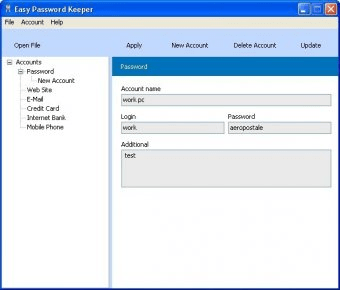
Easy Password Keeper allows you to store all your sensitive pieces of information (such as passwords, credit card numbers, PINs, Bank logins, etc.) in a single and safe password-protected location. This way, all you will have to remember from now on is the master password required to access the rest of the information in a quick and easy way.
The program organizes your information in files, and in accounts inside them. Its main window presents a clean layout that includes a toolbar-like menu from where you can create a new account, delete it, apply the current changes, and search for updates from the developer's website. When you create a new account, the first thing you are asked to do is to choose its type among Password, Website, E-mail, Credit Card, Internet Bank, and Mobile Phone.
For the Password and Website accounts you are asked to input similar sets of information - a URL, the login and its password, and some general comments. For an E-mail account, you can also specify the POP and SMTP information, as well as the e-mail address itself. For the Credit Card account you can store the card number and PIN, the owner's and the Bank's names, and the bank account number. Finally, for a Bank account you can specify an account name, and for the Mobile Phone account you can store the phone number and provider, together with two PINs and two PUK codes. Once you are done, you can save your changes using the "Apply" button - then you will be asked to provide the master password for the whole file, and save it (under the name of your choice) somewhere on your file system.
As mentioned before, the program allows you to create multiple protected files containing any number of accounts of any type - however, note that you will need to remember a master password for each of them.
Pros
- Clear interface design
- Allows you to store information for different accounts in one single file
- Allows you to keep different sets of accounts on different protected disk files
- Allows you to automatically search for updates from the developer's website
Cons
- None
Details
Extensions

No information available
The data will be available later.



Comments